More and more organisations using OpenFIT have multi-disciplinary teams. The ability to move Clients/Patients between different teams (Locations) has therefore been a feature of interest for some time.
The scenario
A common example: a client moves from residential treatment to outpatient treatment. The organisation wants to:
- keep the same client record number,
- open a new case for the outpatient episode, and
- have that client and case sit in a different Location.
How Location works in OpenFIT
In OpenFIT, Location is a property of the Client record — not of the individual case. A single client therefore has exactly one “home” Location at any time.
A case (episode) does not store its own Location: it inherits the Location of the client(s) attached to it. This means that when you change a client’s Location, the cases that client is on move with them automatically — you do not need to create a new case for the client to appear under the new Location.
It also means OpenFIT will not hold the same client in two Locations at once. If you try to place a client in a second Location, OpenFIT keeps the client aligned to a single Location.
How to change a Client’s Location
An authorised user (with access to both Locations) can move a client as follows:
- Open the Case and Client List.
- Edit the client to open the Edit Current Client dialog.
- In the Location field, select the new Location from the dropdown.
- Click Save.
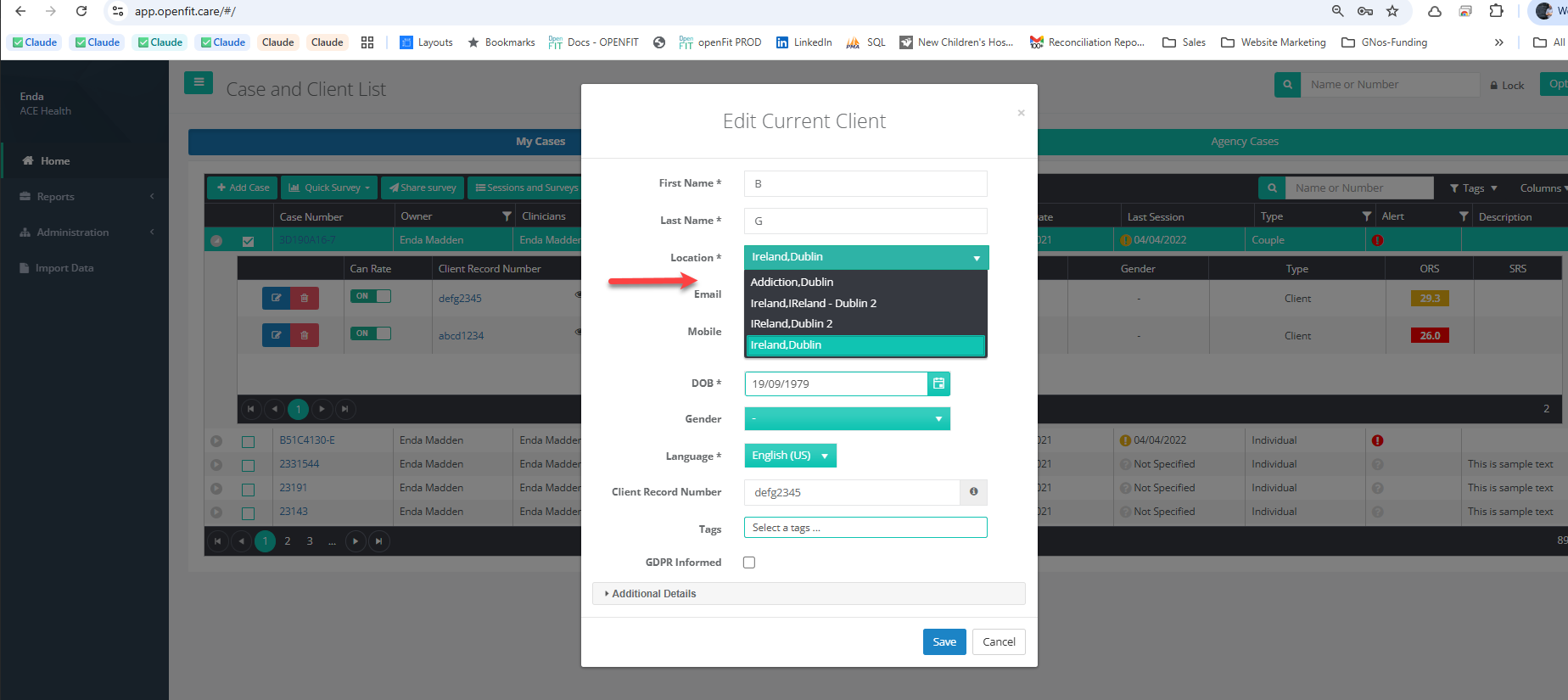
Because Location belongs to the client, changing it moves the client and all of their cases to the new Location. It does not leave the old cases behind, and it does not split the client across two Locations.
Important: cases with more than one client
Some cases have more than one client attached — for example couples or family cases. In these cases, each client has their own Location.
If you change the Location on only one client of a multi-client case:
- only that client moves — the other clients on the case keep their existing Location;
- the case is now split across two Locations, and different screens may show it under different Locations;
- this can make the case appear inconsistently in the case lists.
To move a multi-client case cleanly, change the Location on every client attached to that case so they all share the same Location.
If you need a client in two Locations at the same time
If your requirement is genuinely to have the same person active in two Locations simultaneously (for example an active residential case and a separate outpatient case running in parallel under different teams), this is not currently supported with a single client record. Please raise a support ticket and we will advise on the best option for your configuration.
If you have any questions, contact the OpenFIT support team.
Was this article helpful?
That’s Great!
Thank you for your feedback
Sorry! We couldn't be helpful
Thank you for your feedback
Feedback sent
We appreciate your effort and will try to fix the article